Changing Your Username or Password
When accessing your Remember The Milk account, you must log in using your username and password. During login, if you forgot your username or password, you can use your email address to reset your credentials. Once you log into your account, you can change your username or password within your account settings.
To reset your password during login
-
Go to the login page.
-
Select Forgot password?
-
Enter the email address associated with your Remember The Milk account.
-
Select Reset Password.
You'll receive an email with steps on how to reset your password.
To find your username during login
-
Go to the Forgot Username page.
-
Enter the email address associated with your Remember The Milk account.
-
Select Recover Username.
You'll receive an email with your username.
To change your password while logged in
-
Log in to your account.
-
Click the Settings gear in the ribbon menu.
-
Click Account settings.
-
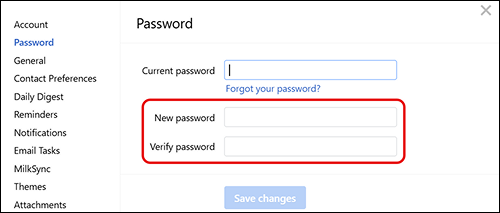
Select Password in the menu bar.
-
Enter your current password.
-
Enter your new password and verify your new password.
-
Click Save changes.
Remember The Milk saves your new password.
To change your username while logged in
-
Log in to your account.
-
Click the Settings gear in the ribbon menu.
-
Select Account settings.
-
Enter your new username in the username field.
-
Click Save changes.
-
Enter your Remember The Milk password in the dialog.
-
Click Save changes.
Remember The Milk saves your new username.
Still need Help?